
 Quick addArden Linen Overshirt$124.003 colours
Drupal Commerce development
Drupal Commerce development for stores built around content, data and governance
When ecommerce has to sit beside complex content, multilingual publishing, technical product data or internal systems, the store needs more than a theme. We plan the content model, Drupal Commerce configuration and buying journey together, then build inside infrastructure your team controls.
- Content plus commerce in one CMS
- Custom entities and governed workflows
- Open source, on your infrastructure

Drupal ecommerce services
The store starts with the content model, not the theme
Drupal works best when products, editorial content and permissions are planned as one system. We define the entities, fields, relationships and publishing rules first. That structure then drives navigation, filtering, multilingual content and the parts editors can manage without developer help.
What the model needs to decide
-
Content architecture
Products, editorial pages and supporting content get clear homes before development starts.
-
Custom entities
Use custom entities only where standard product and content structures do not fit the business.
-
Navigation
Menus and routes follow how customers search, not how teams organise spreadsheets.
-
Collection structure
Categories, taxonomies and filters narrow a large catalogue without hiding useful products.
-
Product presentation
Product templates pull the right data, content and relationships into one useful page.
-
Mobile usability
Commerce layouts are tested at phone width before desktop refinements.
-
Checkout flow
Drupal Commerce steps, payment fields and order states reflect how the business actually sells.
-
System connections
ERP, CRM, PIM, SSO and marketing tools are scoped before integrations are built.
The buying journey
Four screens have to hand off cleanly
A flexible CMS can carry a lot of complexity behind the scenes. The customer should not feel it. Collection, product, cart and checkout each need a clear job, with the right information passed forward at the right moment.
-
01
Collection
A collection page has to turn structured data into a useful choice. We decide which taxonomies become filters, which attributes belong on cards, how translated labels behave and what gets exposed first. In a Drupal Commerce build, those rules come from the content model, so a new product can enter the catalogue without forcing someone to redesign the page.
-
02
Product
The product page brings commerce and content together. Price, availability, variants and purchase controls need to sit beside specifications, documents, editorial copy or related resources when the buyer needs them. We build the template from real fields and relationships so teams update the record once and the page stays consistent across the catalogue.
-
03
Cart
The cart should confirm the choice, surface delivery or account conditions early and keep the next action obvious. If an order carries customer-specific rules, quantity limits or shipping logic, we account for those before checkout rather than adding surprises at the last step.
-
04
Checkout
Drupal Commerce gives more control over checkout than a fixed hosted flow, but that freedom needs structure. We map the steps, required fields, payment gateways, tax rules and order workflow against real scenarios. If approvals, account data or downstream systems affect an order, those dependencies are handled before launch rather than discovered after customers arrive.


When the build needs deeper control
Hire a Drupal Commerce Developer When Content, Commerce and Systems Have to Work Together
Drupal is worth the extra development effort when the store has rules a simpler website builder cannot hold comfortably. The point is not to add complexity. It is to model the complexity the business already has, then keep the customer experience straightforward.


Selected Drupal Commerce work
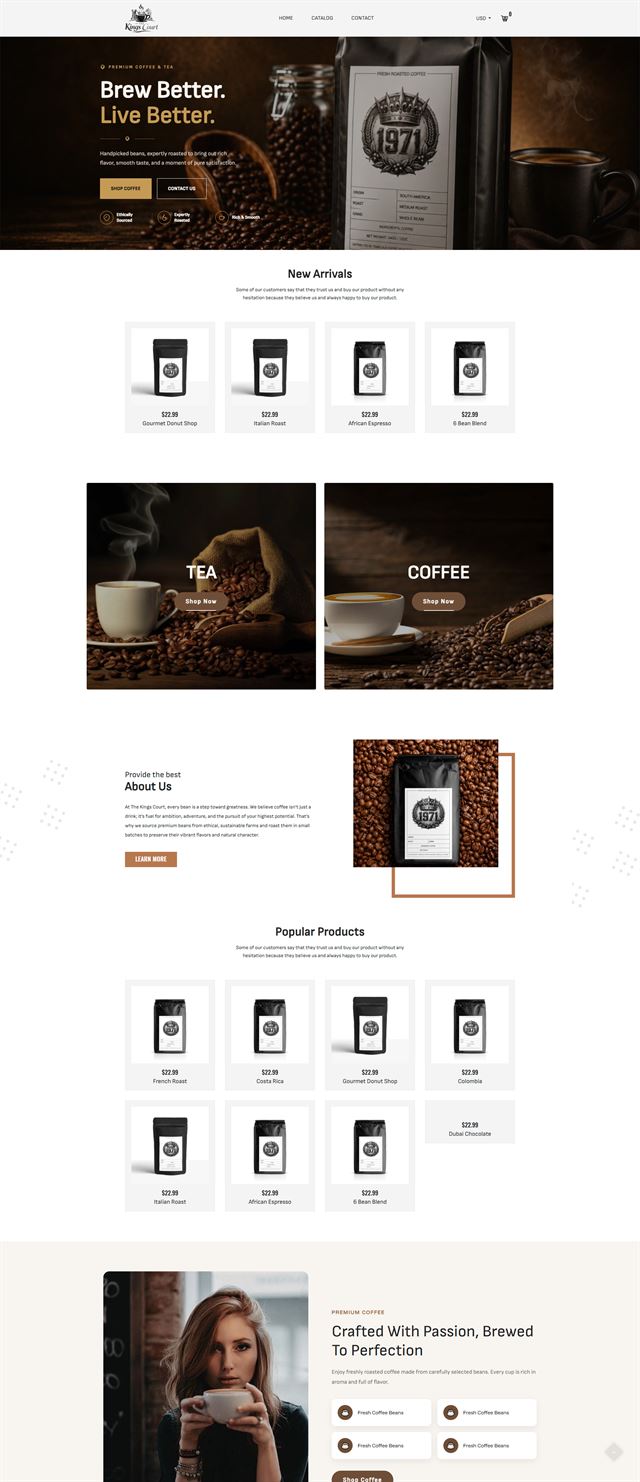
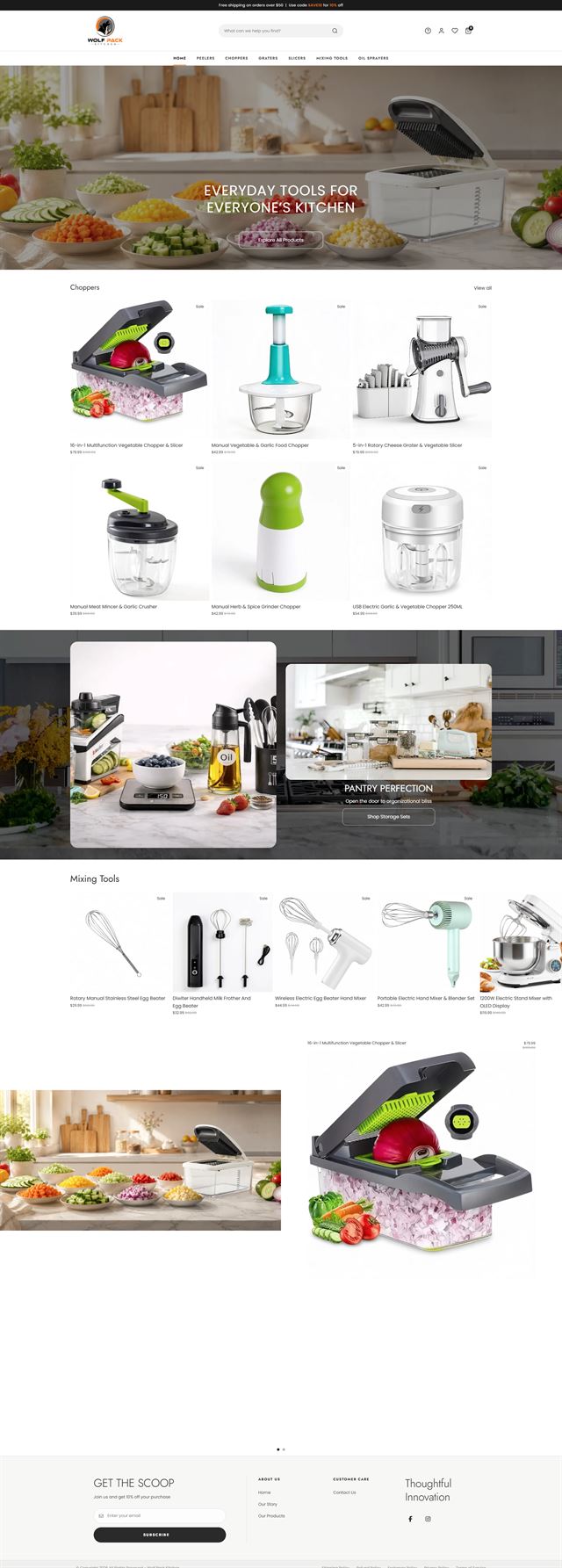
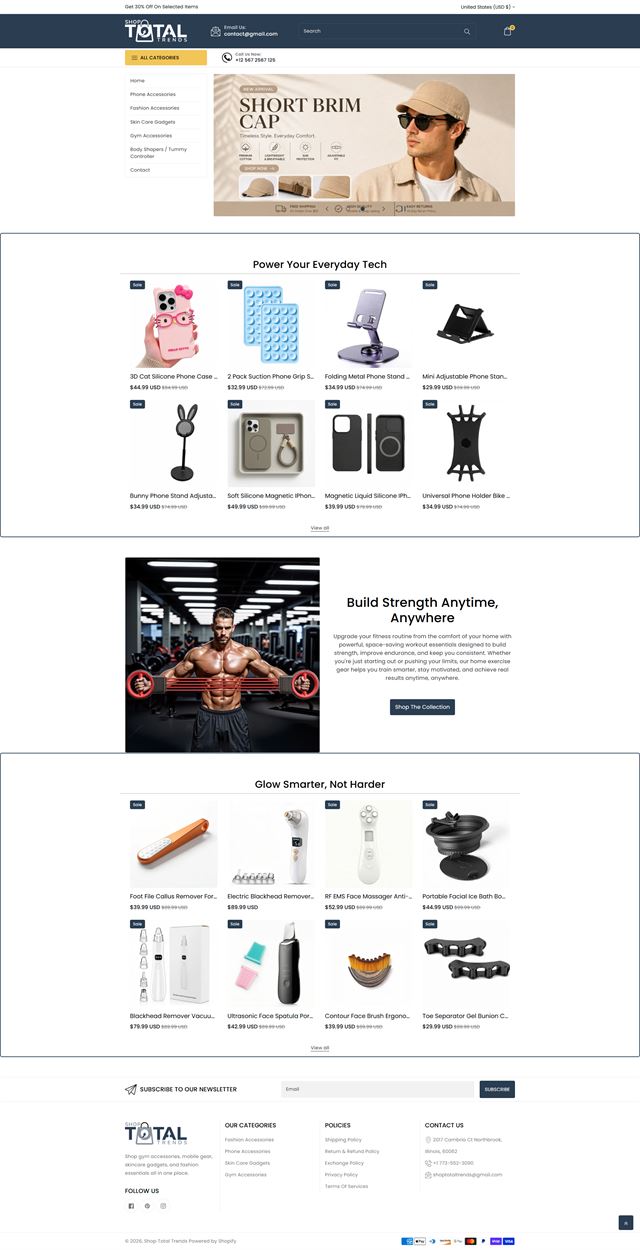
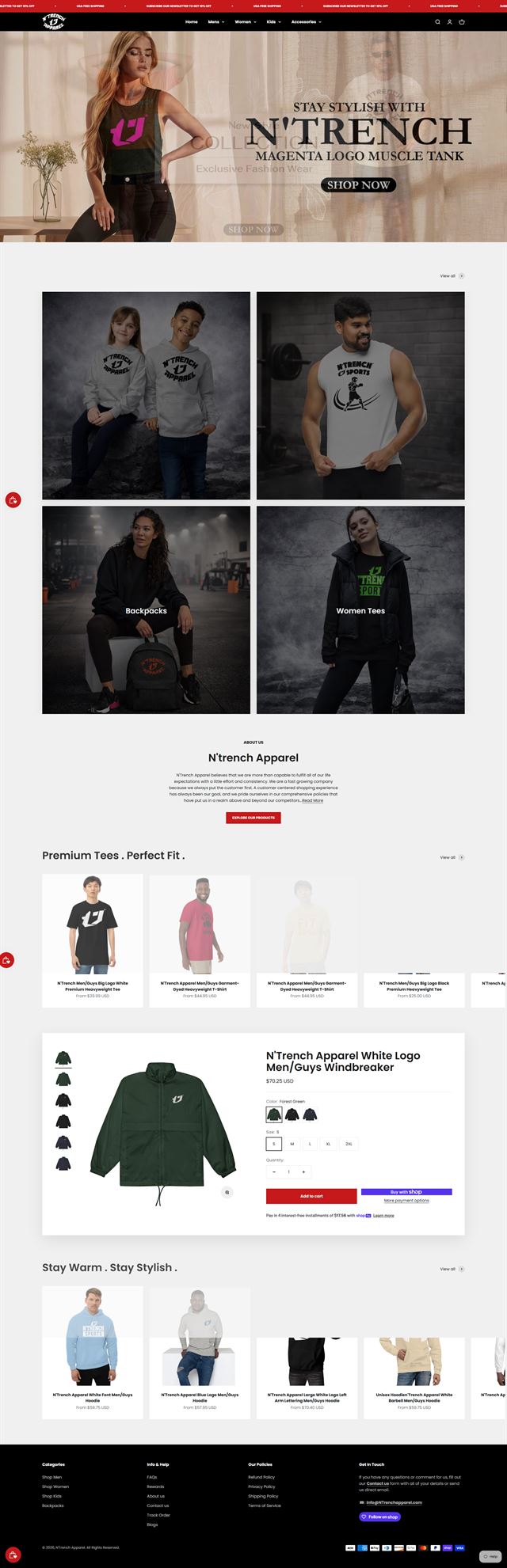
Drupal Commerce work across complex stores
Our Drupal portfolio includes stores where commerce sits inside a larger content platform. Projects may combine multilingual publishing, custom entities, technical product data, customer roles or integrations with ERP, CRM and product information systems. The work shown here reflects how we keep that complexity under control while giving customers a storefront that remains clear and practical to use.


Before the build
Five decisions keep a Drupal Commerce build out of rework
Drupal rewards decisions made early. Before theme work starts, we define the catalogue model, customer journey, navigation, system connections and ownership. These choices shape the entities, fields, permissions and Drupal Commerce module configuration that follow.
Custom entities start with what the business actually sells
We begin with products, variants, attributes and relationships. Some catalogues fit the standard Drupal Commerce product and variation model. Others need custom entities or referenced content for specifications, documents, locations or service data. We decide that boundary early so the model stays useful without turning every exception into custom code.
Discuss your store
The page has to answer the buyer’s next question
A buyer may care about compatibility, availability, certification, delivery, account rules or technical documents before price makes sense. We map those questions to the collection and product templates so the CMS serves the right information at the point of decision. That keeps content useful instead of simply placing more fields on the page.
Discuss your store Navigation should follow the catalogue, not fight it
Drupal makes deep structures possible, but deep does not mean helpful. We agree the taxonomy, menu labels and landing pages around the terms customers use. The structure also needs a sensible place for future products, so growth does not create a new top-level menu item every quarter.
Discuss your store An enterprise CMS has to fit the systems around it
Drupal often sits in the middle of a wider stack. We define what has to move between the store and ERP, CRM, PIM, SSO, payment or fulfilment systems, then document direction, timing and ownership. These integration rules matter as much as the storefront because a clean product page is not useful if prices, stock or customer access are wrong.
Discuss your store Build it where your team can keep control
Hosting, repositories, environments and deployment access are agreed before development starts. Drupal roles control who can manage content, commerce, configuration or approvals. The site remains in infrastructure and accounts owned by your organisation, with agency access limited to what the project needs.
Discuss your store Ecommerce development across leading platforms and marketplaces
We provide ecommerce store development across leading platforms and marketplaces, including Shopify, WooCommerce, WordPress, BigCommerce, Magento, Wix, Squarespace, Webflow, OpenCart, Drupal, Joomla, eBay, Etsy and TikTok Shop. Whether you need a new store, a redesign, a migration or help improving an existing storefront, we shape the structure, product experience and integrations around the way each platform works so customers can browse and buy with less friction while your team has a store that is practical to manage.
-
 Shopify
Store development
Shopify
Store development
-
 WooCommerce
Store development
WooCommerce
Store development
-
 WordPress
Ecommerce development
WordPress
Ecommerce development
-
 BigCommerce
Store development
BigCommerce
Store development
-
 Magento
Store development
Magento
Store development
-
 Wix
Ecommerce development
Wix
Ecommerce development
-
 Squarespace
Ecommerce development
Squarespace
Ecommerce development
-
 Webflow
Ecommerce development
Webflow
Ecommerce development
-
 OpenCart
Store development
OpenCart
Store development
-
 Drupal
You are here
Drupal
You are here
-
 Joomla
Ecommerce development
Joomla
Ecommerce development
-
 eBay
Store development
eBay
Store development
-
 Etsy
Shop development
Etsy
Shop development
-
 TikTok Shop
Shop development
TikTok Shop
Shop development
How we build
From content model to live Drupal Commerce store
Eight stages keep architecture, development and launch in the right order.
-
01
Discovery
We learn the catalogue, audiences, editorial process, internal systems and the people who will run the site.
-
02
Content & commerce model
Products, variations, custom entities, fields, taxonomies and relationships are mapped before theming begins.
-
03
UX & visual direction
The interface is designed around real content, real product data and the actions buyers need to take.
-
04
Drupal Commerce development
We configure the Drupal Commerce module, build the theme, set roles and workflows, and develop the custom pieces the model actually needs.
-
05
Data & integrations
Product data, payment services and business systems are connected against agreed rules.
-
06
Testing
We test mobile and desktop journeys, permissions, checkout states, integrations and representative order scenarios.
-
07
Launch
Domains, environments, redirects, analytics and operational checks are completed before the production switch.
-
08
Refine
After launch, we use real store behaviour and support needs to decide what should change next.
Questions
Drupal Commerce vs Magento, project fit and common questions
What teams usually want to know before choosing Drupal Commerce.
-
It is a strong fit when commerce has to live inside a complex content platform, especially with multilingual publishing, editorial governance, structured product data or internal integrations. If the store is primarily a conventional retail catalogue with simpler content needs, another platform may be easier to run.
-
Drupal Commerce is the commerce framework used to add products, variations, orders, checkout and related commerce logic inside Drupal. We configure it as part of the wider CMS model rather than treating the shop as a separate system.
-
Yes. We start with the content and commerce model, then move into navigation, templates, Drupal Commerce configuration, integrations and testing. The model comes first because it determines what editors, customers and connected systems can do.
-
Yes. We first review the current Drupal version, content model, theme and contributed or custom modules. If the existing foundation is sound, commerce can be added without splitting the site into a separate storefront.
-
Yes, but migration scope depends on the existing site. We assess content types, product data, custom modules, URLs and integrations first, then define what can move directly and what needs to be rebuilt.
-
Yes. We plan which interface text, editorial content, product data and taxonomy terms need translation, then test how those translations behave through browsing and checkout.
-
Yes. Roles, permissions and content moderation are part of the build when the site needs governance. We define who can edit, review, publish or administer each part of the content and commerce model.
-
Yes. ERP, CRM, product information systems, SSO, fulfilment tools and payment providers can be scoped as integrations. We define what moves, in which direction, how often and what happens when a connected system is unavailable.
-
Yes. Drupal is open source, and the site is built on infrastructure and repositories controlled by your organisation. The codebase, configuration, database, content and approved creative remain yours, with access granted only as needed for the project.
-
The schedule depends on the content model, catalogue size, number of roles and languages, custom entities, integrations and the state of the data. We scope those dependencies before giving a timeline because two Drupal Commerce builds can look similar on the surface and be very different underneath.
Ready to plan the build?
Turn complex content and commerce into a store your team can run
Whether you are adding commerce to an established Drupal CMS, replacing a platform that no longer fits, or starting with a new enterprise build, we can define the model, build the storefront and prepare the operation for launch.
On the call, we will look at your catalogue, content model, integrations and governance needs, then explain what belongs in scope and whether Drupal is the right fit.